




Details
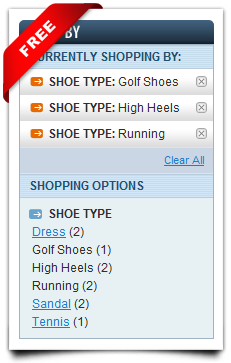
This simple extension makes store navigation more flexible and more user-friendly by enabling store customer to apply multiple values of the same filter criteria. (eg. can browse for yellow and red shoes at the same time)
Extension has no admin configuration, it just works, visually layered navigation does not change, only behavior differs: when store customer chooses one filter item by clicking it, catalog is filtered by chosen item; after applying filter store customer still has possibility to choose and apply other item of the same filter. So you give store customer possibility to apply as many items of the same filter as he likes.
- It's free!
- 100% Open source
- No core code changes
- Easy installation
- It just works - no setup needed
- Works with any attribute filter
- Works with price filter
- Custom design-ready
- Localization-ready
This extension is compatible with the Magento version 1.4.2 and later.
If you have any questions feel free to contact us
.


Customer Reviews
Write Your Own Review
Works with 1.9.3.7
Works like it should
Great Extension
Good one
Great Extension, Great Support
Excellent
Great Product Great Support!
Absolutely superb.
The product is great too!! :-)
Prompt response! gr8 product and results
manadev.com's prompt response is gr8! so helpful. totally recommended it..
Great extension for free
Excellent work
Developer support is excellent...:)
Thanks
Working as expected
After a quick scroll down the reviews I was able to locate a quick fix:
In order to adapt the extension to theme with right column layout, please follow these steps:
Copy app/design/frontend/base/default/layout/mana_filters.xml to app/design/frontend/[yout package]/[your theme]/layout/mana_filters.xml.
In copied file, change <reference name="left"> to <reference name="right"> (3 times - for catalog pages, for quick search pages and for CMS pages).
Save changes and refresh Magento layout cache.
I also thought this extension would style the navigation but I was wrong.
Thanks for this FREE extension.
Works with the enterprise version
Blank screen in combination with B2B Proffessional
Thanks for this great extension.
Maybe you have a solution for this as well.
Great Magento Extension
Great Support and extension that do what is promissing
I needed support twice for general questions that will help me to decide how to Implement the extension and both times the reply came within half an hour !!!
And this was for free.
Very Useful extension
I wisht to share the issue which i face and troubleshoot.
Price filter text change the default magento price filter. It shows (Rs 0- Rs 100) instead of (Rs 0 - Rs 99).
To troubleshoot this issue,
* In file (app\code\local\Mana\Filters\Model\Filter\price.php) line no 35,
from
$toPrice = $store->formatPrice($range['to'], false);
change to
$toPrice = $store->formatPrice($range['to']-1, false);
I hope this issue will solve with this extension asap.
Thanks and Congratz again for created the excellent module.
Best user experience and highest speed
Thank you, Manadev team!
Was all I needed
Excellent extension
Excellent extension, only one question... the meta title is auto setting to the category name, can i disable this?